Build reusable structures

Practical Quarto: Patterns, templates, and tooling @ posit::conf(2026)

Charlotte Wickham
&  
Mine Çetinkaya-Rundel

Templates and template partials

What is a template?

You write a document.
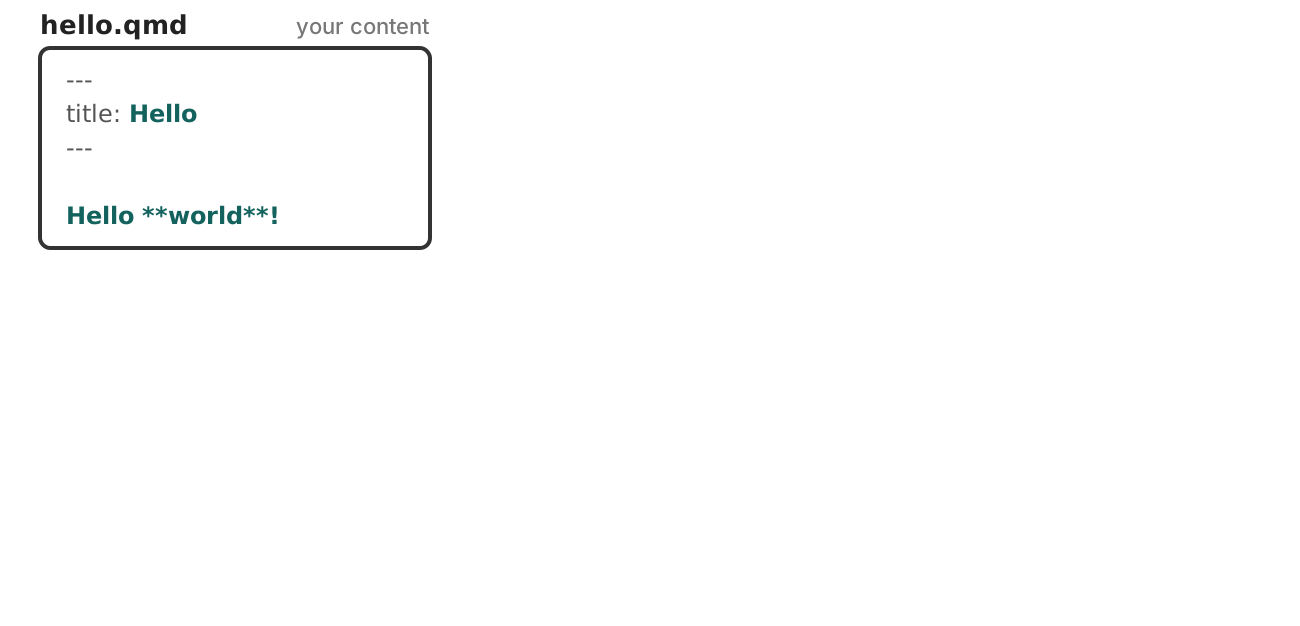
One box, labelled hello.qmd, your content, holding a short Quarto document: a YAML header setting title to Hello, then the line Hello asterisk asterisk world asterisk asterisk exclamation mark. The value Hello and the body line are teal.

What is a template?

Render it, and you get an HTML document.
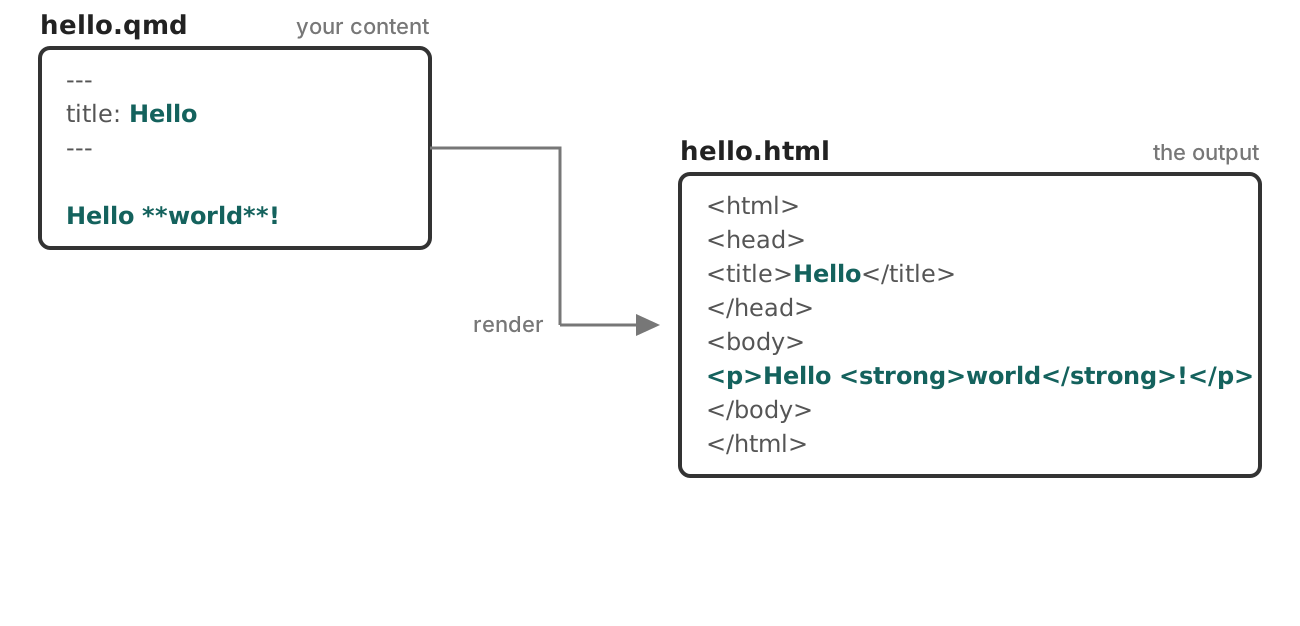
The document on the left, with a connector stepping down from it, labelled render, arrowing into hello.html on the right: a full HTML page of which only two parts are teal, Hello inside the title element and a paragraph reading Hello world. Everything else is grey, and nothing yet explains where it came from.

What is a template?

A template: boilerplate, with named holes.
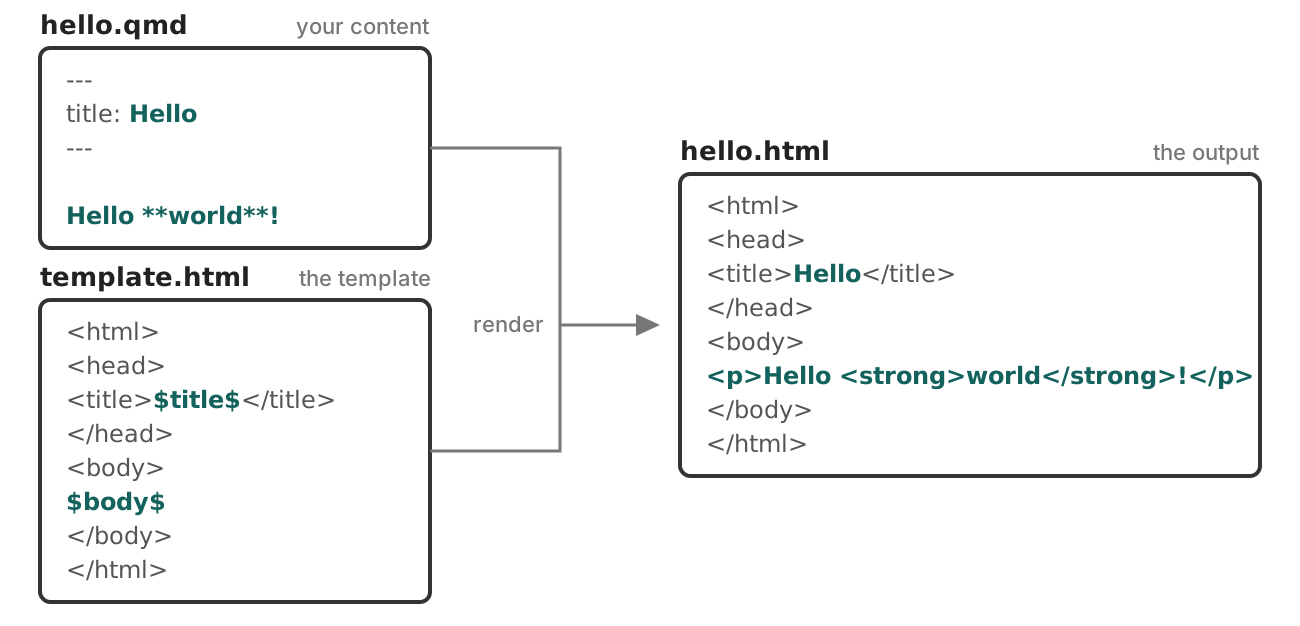
The same figure with template.html revealed below the document, its connector joining the render line. The template is HTML boilerplate with two teal placeholders, dollar title dollar inside the title element and dollar body dollar inside the body. They line up with the two teal parts of the output, and the grey boilerplate lines up with the grey output.

What is a partial?

Part of the template renders the title block.
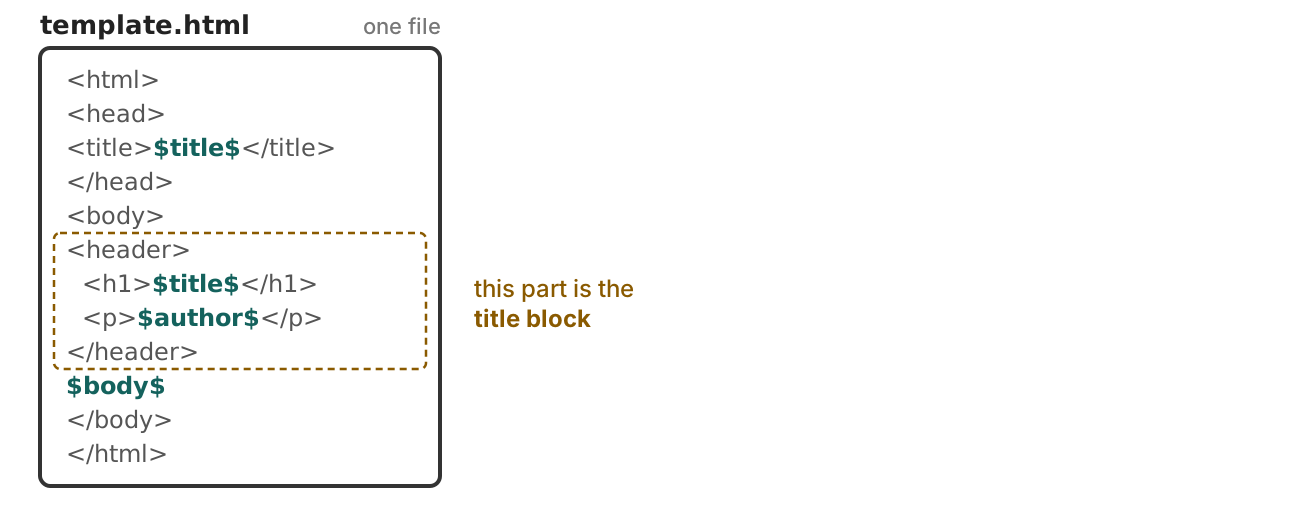
A box labelled template.html, one file, holding a small but complete HTML template: html, head, a title element with the teal dollar title dollar, then a body containing a header element with an h1 of dollar title dollar and a paragraph of dollar author dollar, then dollar body dollar. The header element and its two indented lines are ringed in an amber dashed box, annotated: this part is the title block.

What is a partial?

Pull it out into its own file, now its a partial.
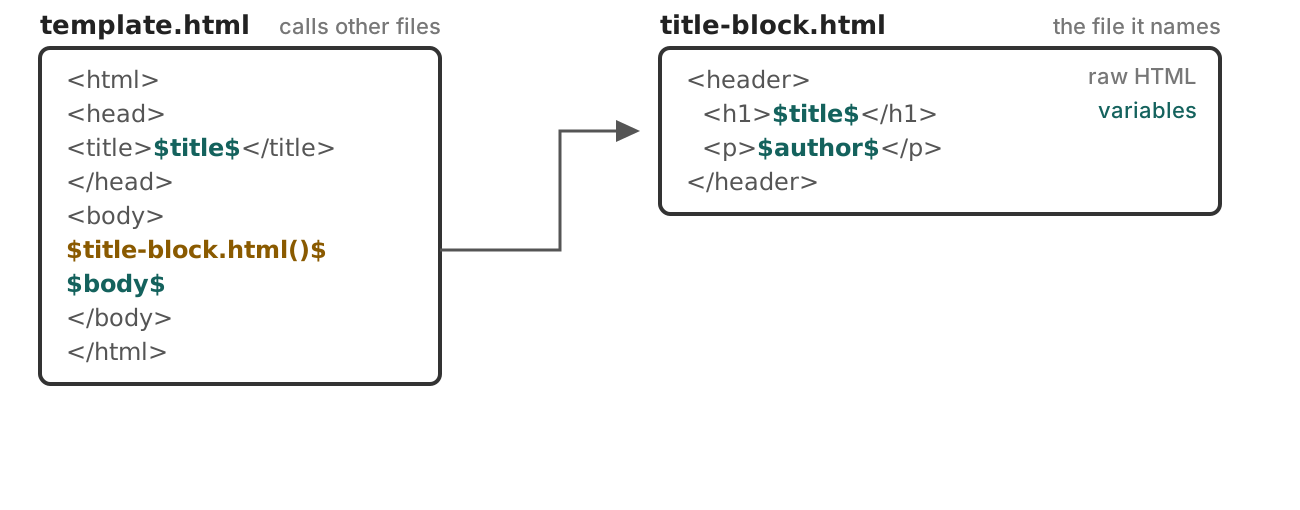
The same template.html box, with the header markup gone and the amber call dollar title-block dot html parens dollar in its place. A connector runs from that call to a new box on the right, labelled title-block.html, the file it names, holding the header element with an h1 of the teal dollar title dollar and a paragraph of the teal dollar author dollar. Its tags are annotated raw HTML and its placeholders annotated variables.

What is a partial?

Quarto does this for many parts of the page.
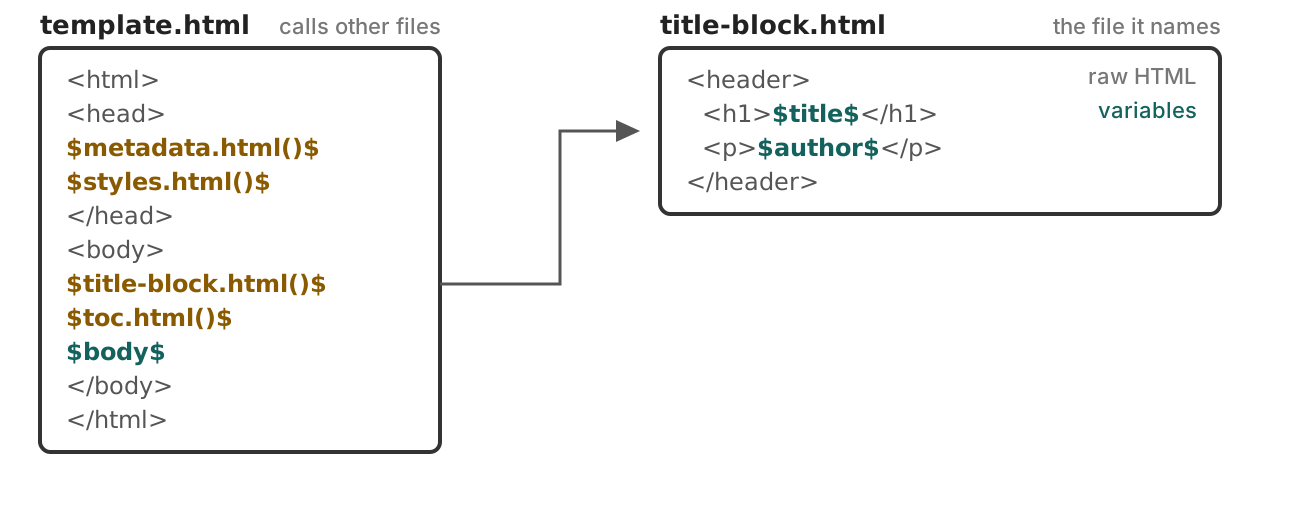
The same figure, with the rest of the template also replaced by amber calls: dollar metadata dot html parens dollar and dollar styles dot html parens dollar in the head, and dollar toc dot html parens dollar beside the title-block call in the body. Only dollar body dollar, in teal, and the literal html, head and body tags remain.

What is a partial?

Replace a partial without touching the rest of the template
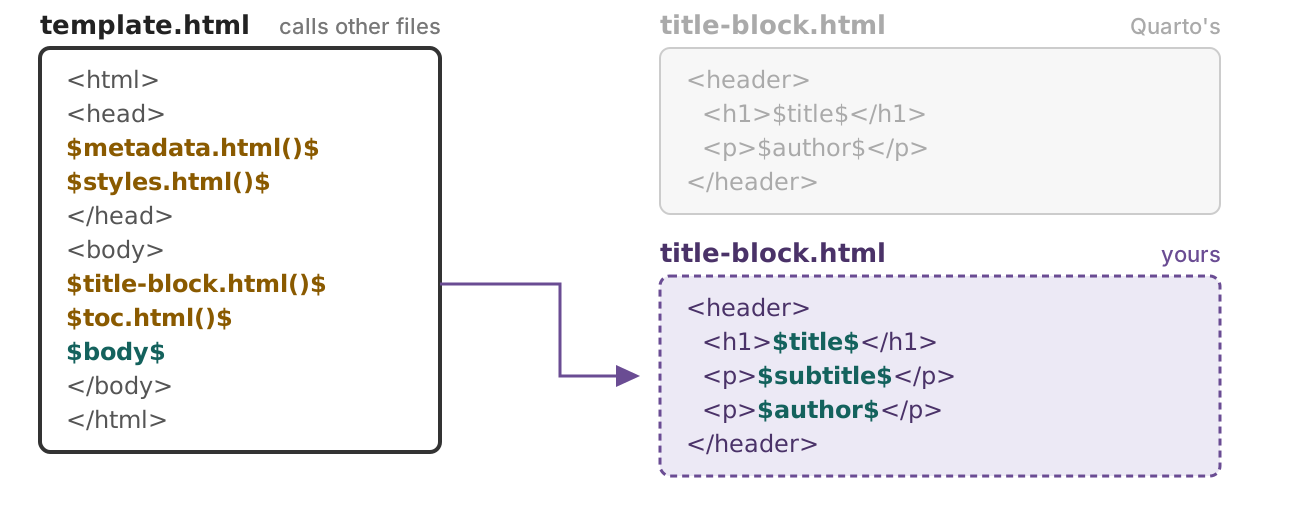
The same figure with Quarto's title-block.html box faded to grey and a second box below it drawn with a purple dashed border, labelled title-block.html, yours. It holds the same header element plus an extra paragraph containing the teal dollar subtitle dollar. The connector from the call now points at your box.

Case study

The Bureau of Regional Statistics publishes a quarterly release as a standalone HTML file.

Every release must carry:

  • the agency masthead
  • the reference period and the region
  • the release status — Provisional, Revised, or Final

The finished title block. The agency logo and wordmark sit at the top right. Regional Employment Indicators is large and bold at the left, with the subtitle Quarterly statistical release beneath it. Below that, in small grey letter-spaced capitals, Q3 2026 dot OREGON. Under that a dark green rectangular badge reads PROVISIONAL in white capitals. Author and Published run along the bottom in two columns.

Setup: replace the partial

(Optional) Follow along: 03-partials/00-setup

  1. Pull the brand:

    quarto use brand posit-conf-2026/practical-quarto-exercises/brs-brand
  2. Copy templates/title-block.html into the folder.

  3. Register it:

    report.qmd
    format:
      html:
        template-partials:
          - title-block.html

Our starting point

The title block after the setup demo. Regional Employment Indicators in large bold type, the subtitle Quarterly statistical release below it, then Author, Bureau of Regional Statistics, and Published, September 14 2026, in two columns. No logo, no reference period, no status.

Your turn 1: add the masthead

  1. Add a masthead key to the YAML of report.qmd:

    masthead: _brand/brs-logo.svg
  2. Add this line to title-block.html, right after <header ...>:

    <img src="$masthead$" alt="Bureau of Regional Statistics" class="report-masthead">
  3. Render.

  4. Challenge: Provide the alt text via metadata too.

Exercise: 03-partials/01-masthead

The same title block with the agency logo and wordmark now added above the title, at full size on the left. Below it, Regional Employment Indicators, the subtitle, and the Author and Published columns.

Pandoc template syntax

Write in the format you are targeting: HTML here

Anything inside $...$ or ${...} is Pandoc’s template syntax.

Write Get
$title$ the value of the title metadata key
$brs-release.period$ reach into nested metadata with a dot
$title-block.html()$ include a partial — the () mean a file

Pandoc’s template syntax →

Your turn 2: add period and region

Already in your YAML, and shown by nothing:

report.qmd
brs-release:
  period: "Q3 2026"
  region: Oregon
  1. Copy, then complete, this line to title-block.html, below the subtitle’s $endif$:

    <p class="report-period">______ &middot; ______</p>
  2. Render. What happens when you remove brs-release from report.qmd?

Exercise: 03-partials/02-period-and-region

The title block with a new line reading Q3 2026 dot Oregon added below the subtitle, in the same size and colour as body text.

Your own metadata, your own namespace

report.qmd
masthead: _brand/brs-logo.svg   # our name at the top level
brs-release:                    # our name with names inside
  period: "Q3 2026"
  region: Oregon

Every top-level name you invent is a bet that Quarto will never claim it.

Nest, and you place that bet once instead of once per field.

Condition markup on presence

title-block.html
$if(subtitle)$
<p class="subtitle lead">$subtitle$</p>
$endif$

Read as if subtitle has a value, then….

Prevents empty <p></p> in the document.

Your turn 3: add status

  1. Add status: Provisional under brs-release: in report.qmd.

  2. In title-block.html, below the reference period, show the status in a <span class="report-status"> — but only when brs-release.status is set.

  3. Render. Then delete the status: line and render again — the badge should disappear, leaving nothing behind.

Exercise: 03-partials/03-release-status

The title block with the word Provisional added below the reference period line, in plain body text with no styling.

More Pandoc template syntax

Write Get
$if(x)$ … $else$ … $endif$ conditionals
$for(x)$ … $endfor$ loop over an array
$sep$ inside a loop: emitted between items, never after the last
${x/uppercase} a pipe — also lowercase, length, reverse, nowrap, …
$-- a comment, to the end of the line

Pandoc’s template syntax →

For HTML: styling lives outside the partials

title-block.html
<span class="report-status">$brs-release.status$</span>

No color. No size. No position. Just a class.

Style using SCSS:

custom.scss
/*-- scss:rules --*/
.report-status { background-color: $primary; }

Three classes:report-masthead,report-period, report-status.

Your turn 4: style what you built

Don’t edit title-block.html.

  1. Ask Posit Assistant to style your title block. Start with the prompt below then describe what you want.

  2. Render. Not what you asked for? Say what is wrong and go again.

  3. Skim custom.scss. Change one of the brand variables used and render again.

Example prompt:

I'm in @03-partials/04-style. Write SCSS to style my title block. Use our brand variables ($primary, $secondary, $brand-forest, $text-muted) and never a hard-coded color.

Exercise: 03-partials/04-style

One answer

The finished title block. The agency logo and wordmark sit at the top right. The title Regional Employment Indicators is large and bold at the left, the subtitle Quarterly statistical release below it in muted slate, then the reference period Q3 2026 dot Oregon in small grey text. Below that a dark green rounded pill reads PROVISIONAL in white capitals. Author and Published run underneath in two columns, and a dark green rule closes the block.

I'm in @03-partials/04-style. Write SCSS to style my title block. Use our brand variables ($primary, $secondary, $brand-forest, $text-muted) and never a hard-coded color.

I want the masthead on the right, and the status styled like a badge.
/*-- scss:rules --*/

// Accent rule under the whole masthead block.
#title-block-header {
  border-bottom: 3px solid $primary;
  padding-bottom: 1rem;
  margin-bottom: 1.5rem;
  // Clear the floated masthead so the description/metadata sit below.
  overflow: hidden;
}

// Logo floats to the right of the title text.
.report-masthead {
  float: right;
  width: auto;
  max-height: 4rem;
  margin-left: 1.5rem;
}

.subtitle {
  color: $secondary;
}

// Release period reads as secondary metadata.
.report-period {
  color: $text-muted;
  font-size: 0.9rem;
  margin-bottom: 0.75rem;
}

// Status pill. color-contrast() picks a readable foreground from the
// brand background instead of hard-coding black or white.
.report-status {
  display: inline-block;
  padding: 0.25em 0.75em;
  border-radius: 999px;
  background-color: $brand-forest;
  color: color-contrast($brand-forest);
  font-size: 0.75rem;
  font-weight: 600;
  letter-spacing: 0.05em;
  text-transform: uppercase;
}

Wrapping up

Replace partials to…

  • Expose custom metadata fields in title-block for format: html
  • Zhuzh up your title-slide 💅 in format: revealjs
  • Create a custom layout for format: typst

Partials for various formats

They exist! https://quarto.org/docs/journals/templates.html

document-metadata.latex
passoptions.latex
doc-class.tex
fonts.latex
font-settings.latex
common.latex
pandoc.tex
  tables.tex
  graphics.tex
  citations.tex
  babel-lang.tex
  tightlist.tex
  biblio-config.tex
after-header-includes.latex
hypersetup.latex
before-title.tex
title.tex
before-body.tex
toc.tex
before-bib.tex
biblio.tex
after-body.tex
numbering.typ 
definitions.typ
typst-template.typ
page.typ
typst-show.typ
notes.typ
biblio.typ
metadata.html
title-block.html
  title-metadata.html 
    _title-meta-author.html
toc.html
toc-slide.html
title-slide.html
passoptions.latex
doc-class.tex
fonts.latex
font-settings.latex
common.latex
pandoc.tex
  tables.tex
  graphics.tex
  citations.tex
  babel-lang.tex
  tightlist.tex
  biblio-config.tex
after-header-includes.latex
hypersetup.latex
before-title.tex
title.tex
before-body.tex
toc.tex
before-bib.tex
biblio.tex
after-body.tex

Full or partial?

  • Replacing an entire template offers full control of output but comes with the risk of omitting required variables that can break Pandoc/Quarto features.

  • Safer approaches:

    • Selectively replace partials that exist within the master LaTeX or HTML template

    • Replace the entire LaTeX or HTML template, but then include partials provided with Quarto to ensure that your template takes advantage of all Pandoc and Quarto features

Sharing: a custom format extension

Everything you built, in one folder someone else can install:

_extensions/brs/
_extension.yml
title-block.html
brs.scss
brs-logo.svg
_extension.yml
title: BRS Report
author: Bureau of Regional Statistics
version: 1.0.0
contributes:
  formats:
    html:
      masthead: brs-logo.svg
      template-partials:
        - title-block.html
      theme: [default, brs.scss]

Example: brs-format

Creating formats →

Questions?

Resources

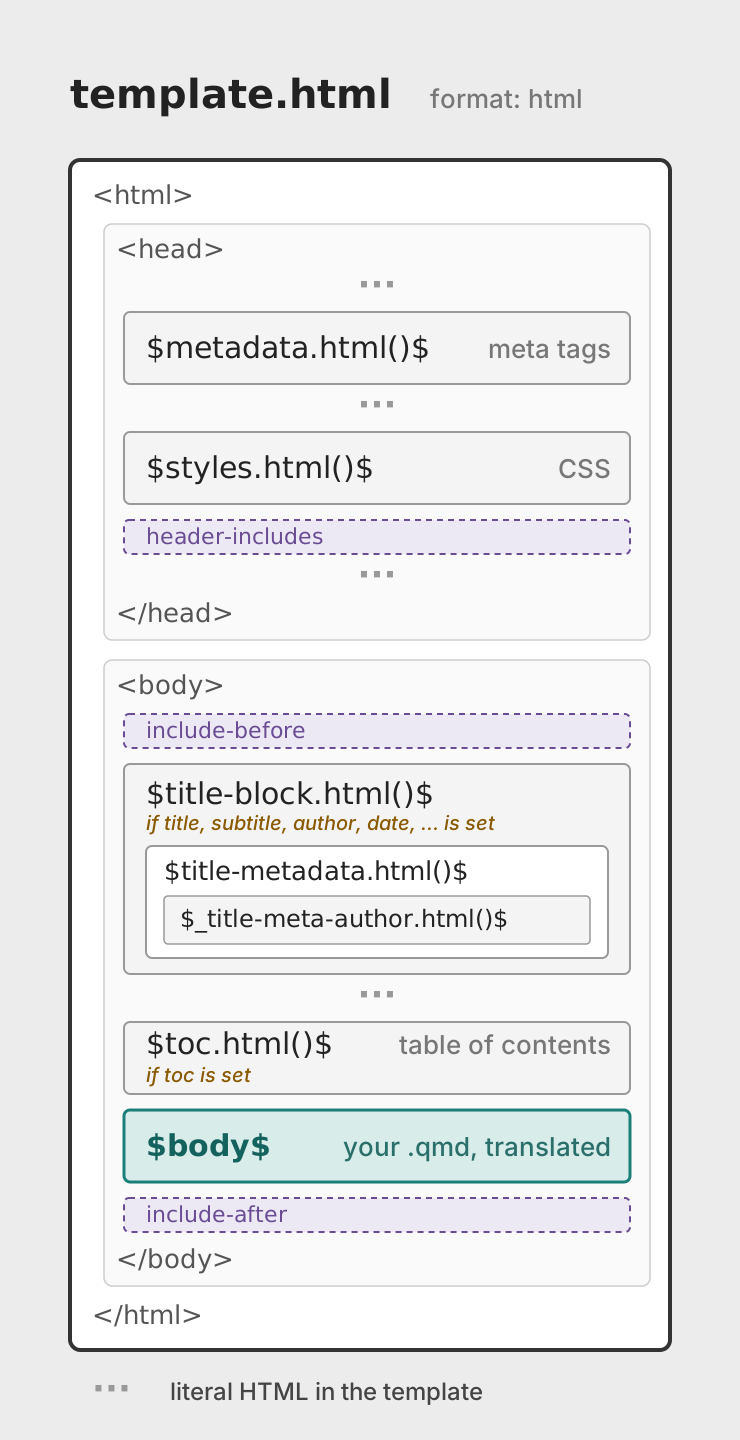
The full template.html

A schematic of template.html as an ordered stack inside literal html, head, and body tags, each section drawn as a box. Inside the head: metadata.html (meta tags), styles.html (CSS), and a dashed header-includes slot. Inside the body: a dashed include-before slot; title-block.html (only if title, subtitle, author, date, or similar metadata is set), drawn as a container nesting title-metadata.html, which nests _title-meta-author.html; toc.html (table of contents, only if toc is set); the body; and a dashed include-after slot. Dotted marks between the boxes indicate the template's literal HTML boilerplate.

html/pandoc/template.html →

There is more than one title-block.html

Quarto picks one for you based on your YAML, and the docs link to the wrong one for the default:

Your YAML Partial that renders
(nothing — Bootstrap default) templates/title-block.html ← you used this one
title-block-banner: true templates/banner/title-block.html
title-block-style: manuscript templates/manuscript/title-block.html
title-block-style: none pandoc/title-block.html — Pandoc’s plain block

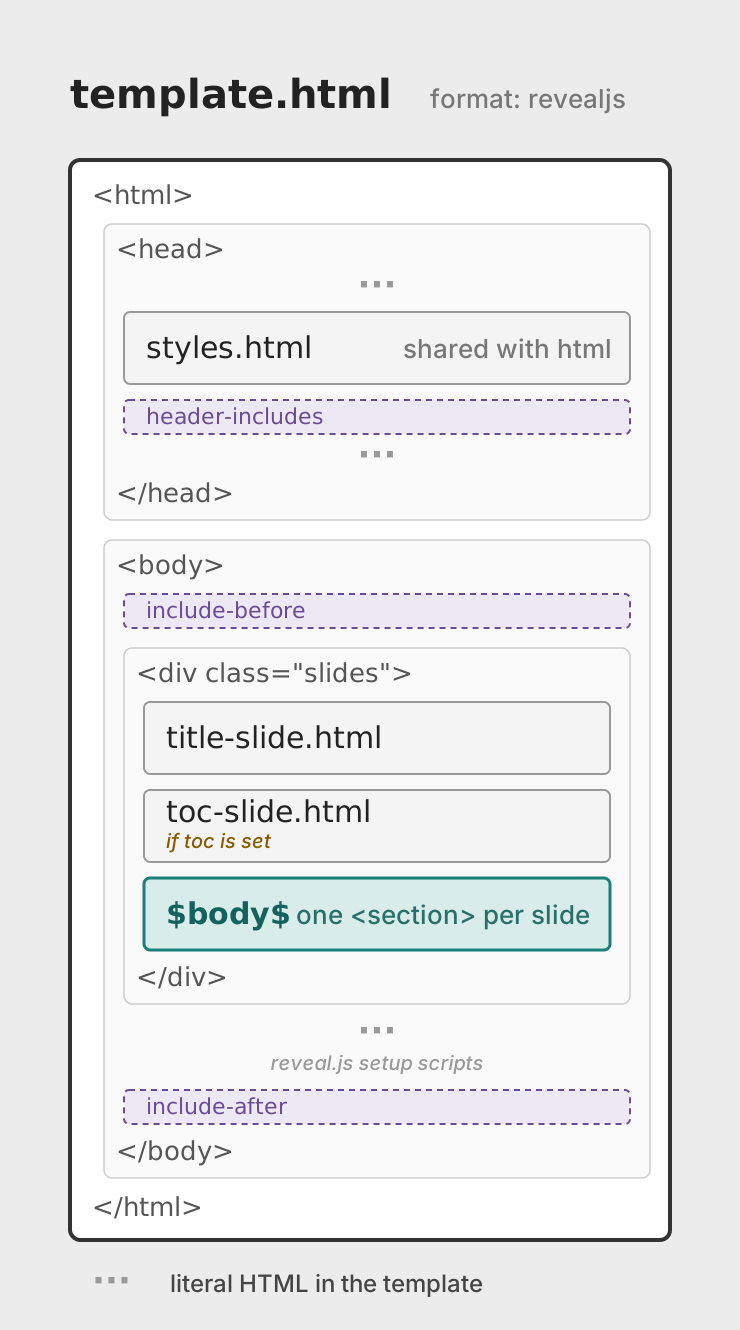
Template: format: revealjs

A schematic of template.html for revealjs as an ordered stack inside literal html, head, and body tags, each section drawn as a box. Inside the head: styles.html (shared with the html format) and a dashed header-includes slot. Inside the body: a dashed include-before slot, then a box marking the div with class slides, holding title-slide.html, toc-slide.html (only if toc is set), and the body (one section element per slide), then the template's literal reveal.js setup scripts shown as a dotted mark, and last a dashed include-after slot. Dotted marks between the boxes indicate the template's literal HTML boilerplate.

revealjs/pandoc/template.html →

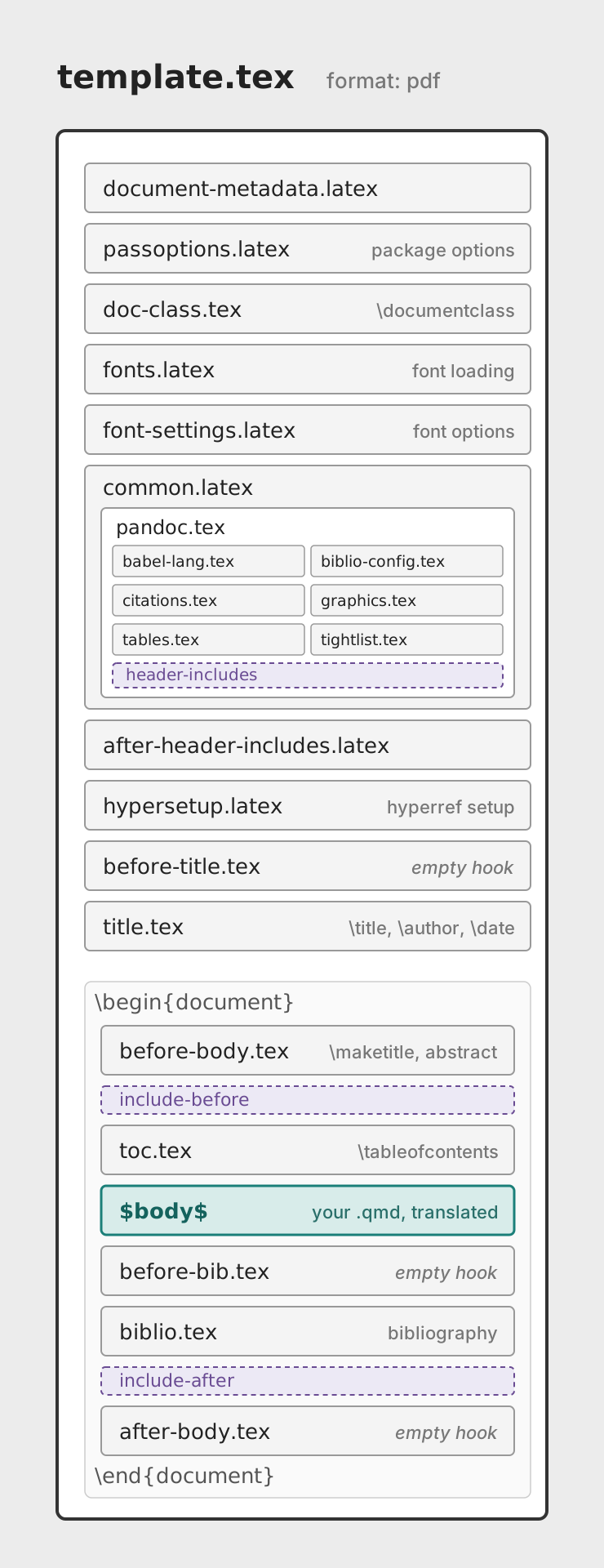
Template: format: pdf

A schematic of template.tex as an ordered stack of partial files. The preamble partials come first: document-metadata.latex, passoptions.latex, doc-class.tex, fonts.latex, and font-settings.latex, then common.latex drawn as a container nesting pandoc.tex, which holds six leaf partials (babel-lang, biblio-config, citations, graphics, tables, tightlist) and the dashed header-includes slot, then after-header-includes.latex, hypersetup.latex, before-title.tex (empty hook), and title.tex. The document section, delimited by the literal begin-document and end-document lines, holds before-body.tex, a dashed include-before slot, toc.tex, the body, before-bib.tex (empty hook), biblio.tex, a dashed include-after slot, and after-body.tex (empty hook).

pdf/pandoc/template.tex →

Localized strings in templates

Hard-coding “Table of contents” in a partial breaks the moment someone sets lang:.

Since Quarto 1.10, the strings Quarto already translates are template variables:

<h2>${quarto.language.toc-title-document}</h2>
lang: en lang: fr
Table of contents Table des matières
Abstract Résumé

Localized strings in templates →