Setup
Please complete the following steps before the workshop so we can dive straight into the material.
You need:
A laptop
A recent version of Positron, preferably the latest release. Go here:
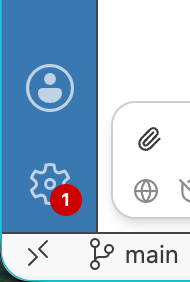
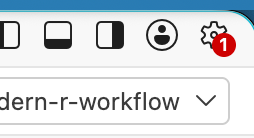
If you already have Positron, check for an update! A red badge on the gear icon (lower-left or upper-right, depending on your layout) means an update is available:
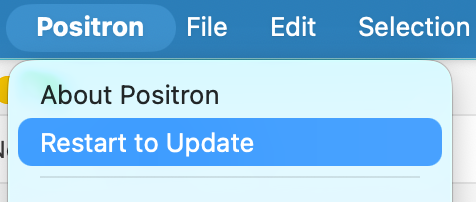
You can also check the application menu (e.g. on macOS, the Positron menu): if there’s an option like “Restart to Update”, choose it
A recent version of R (>= 4.2), but preferably the current version, which is R 4.6.1
- https://cloud.r-project.org/
- If you’re updating R, consider using rig to do so: https://rig.r-lib.org. Then, in a terminal, do
rig add release.
Get your R installation ready for package development work. In R:
install.packages("pak"): pak is our preferred way to install packagespak::pak("devtools"): installs devtools pak::pak(“devtools”)pak::pak("devtools", upgrade = TRUE): more aggressive version of the above that brings all of devtools’s dependencies up to their latest releasedevtools::dev_sitrep(): gives a package development “situation report”
Sign up for Posit AI Pass using the same email address as your conf/workshop registration. You can start a free trial and, if your email matches what we have, we can give you credits to use on the day of the workshop.
- https://posit.ai/
- Open Posit Assistant in Positron and sign in with your Posit AI Pass
- Say “hi” to Posit Assistant to check that all is well. Expect a response along the lines “Hello, how can I help?”.
- If you need to use Posit AI Pass with a different email than your conf registration, ask a TA to help you sort this out.
- The “Using Posit AI Pass token credits” section of the Workshop Tech Setup is relevant to our workshop.
Join us on Discord, our primary communication method during the workshop:
- Join the posit::conf Discord server: pos.it/joinconf26; sign up for an account if you don’t already have one
- Set your display name to the one you used to register for the conference
- In your “About me,” put the name of the workshop you’re enrolled in
- Then head to the workshop channel: #workshop-modern-r-workflow
Optional: Get the development version of Posit Assistant by pressing Cmd/Ctrl + Shift + P to open the command palette and run
Posit Assistant: Check for newer dev build. Follow the prompts to restart Posit Assistant.Optional: We won’t be teaching Git or GitHub, but you’ll see us use them throughout the workshop. If you’ve been meaning to install Git or set up a GitHub account, now’s a good time. Happy Git with R is a great resource for getting set up.